1. 本地搭建 Hexo 静态博客
- 新建一个文件夹(如
MyBlog),进入该文件夹内,右击运行 Git Bash,输入:
没错,博客主体到此完成。运行:
这时候打开浏览器,输入 localhost:4000 就可以看到博客目前的样子了。按 Ctrl + C 结束本地服务。
2. Hexo 主题选择
1
| git clone https://github.com/theme-next/hexo-theme-next themes/next
|
打开根目录下的 _config.yml,修改字段 theme 为 next。
3. Hexo 与 GitHub 分支
- 创建一个
source 分支,用于本地修改与部署。
- 创建
master 分支,用于存储静态网站文件(由 hexo generate 生成)。要修改时在 source 分支更改,再执行 hexo generate 并部署到 GitHub Pages。
4. 新机器快速部署 init.bat
注意:机器的 GitHub 私密钥一致。
1
2
3
4
5
6
7
8
9
10
11
12
13
14
15
16
17
18
19
20
21
22
23
24
25
26
27
28
29
30
31
32
33
34
35
36
37
38
39
40
41
42
43
44
45
46
47
| @echo off
echo Starting project initialization...
:: 检查必要的程序是否安装
where git >nul 2>nul
if %errorlevel% neq 0 (
echo Git is not installed! Please install Git first.
pause
exit /b 1
)
where node >nul 2>nul
if %errorlevel% neq 0 (
echo Node.js is not installed! Please install Node.js first.
pause
exit /b 1
)
:: 克隆项目
echo Cloning the repository...
git clone git@github.com:Jatpeng/jatpeng.github.io.git blog
cd blog
:: 切换到 source 分支并拉取最新更新
echo Switching to source branch and pulling updates...
git checkout source
git pull origin source
:: 安装依赖
echo Installing dependencies...
call npm install
:: 安装主题相关依赖
echo Installing theme dependencies...
call npm install hexo-theme-next --save
call npm install hexo-deployer-git --save
:: 复制 push.bat(如果存在)
if exist push.bat (
echo Copying deployment script...
copy push.bat ..\push.bat
)
echo Project initialization completed!
echo You can now use 'hexo server' to start local development
echo Or use push.bat to deploy your changes
pause
|
5. 快速提交和 push.bat
1
2
3
4
5
6
7
8
9
10
11
12
13
14
15
16
17
18
19
20
21
22
23
24
25
26
27
28
29
30
31
32
33
34
35
36
37
38
39
40
41
42
43
44
45
46
47
48
49
50
| @echo off
echo Starting Hexo deployment process...
:: 设置工作目录为脚本所在目录
cd /d "%~dp0"
:: 检查 Git 是否可用
where git >nul 2>nul
if %errorlevel% neq 0 (
echo Git is not installed or not in PATH
pause
exit /b 1
)
:: 清理和生成
call hexo clean
call hexo generate
:: 添加所有更改
echo Adding changes to git...
git add .
:: 获取当前时间作为提交信息
set "datetime=%date:~0,4%%date:~5,2%%date:~8,2%_%time:~0,2%%time:~3,2%%time:~6,2%"
set "commit_msg=Update site %datetime%"
:: 提交更改
echo Committing changes...
git commit -m "%commit_msg%"
:: 确保在 source 分支
echo Checking out source branch...
git checkout source
:: 推送到远程仓库
echo Pushing to remote repository...
git push origin source
if %errorlevel% neq 0 (
echo Error occurred during git operations
pause
exit /b 1
)
:: 部署到 GitHub Pages
echo Deploying to GitHub Pages...
call hexo deploy
echo Deployment completed successfully!
pause
|
6. Hexo Typora 图片编辑
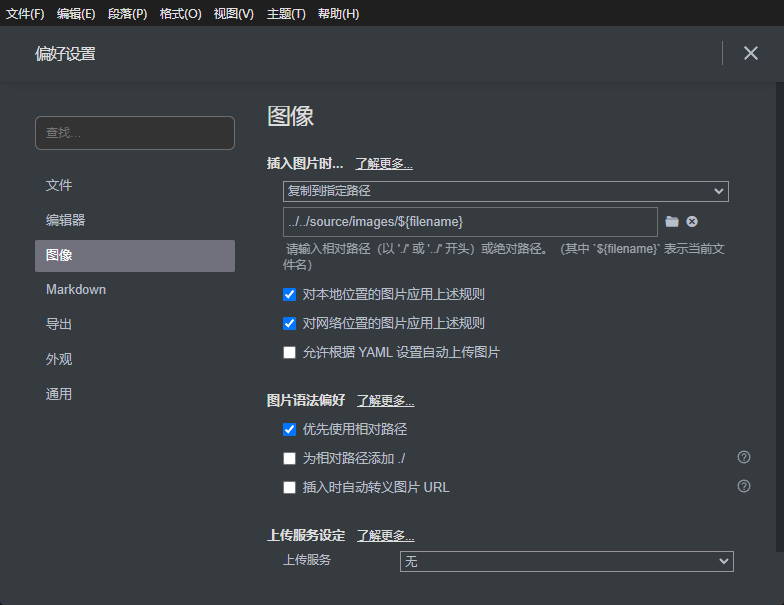
1. Typora 图片设置
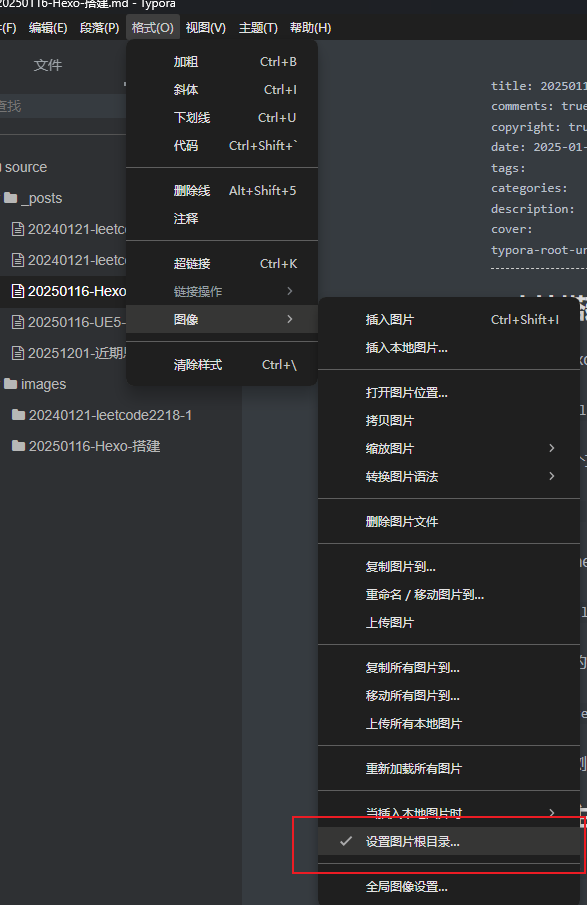
2. Typora 设置图片的根目录
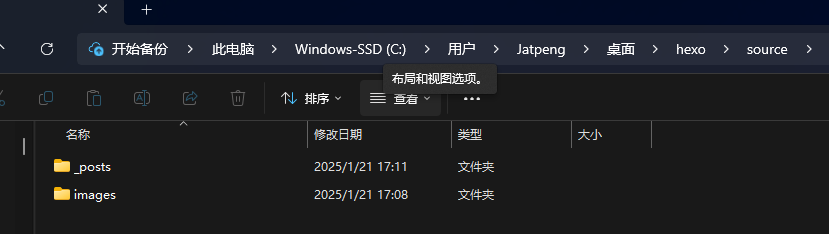
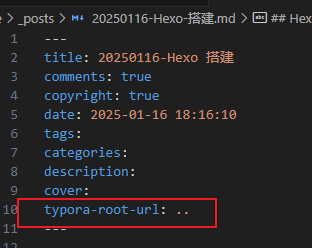
设置完后,Markdown 文件里会显示: